How to Play
Build your Town
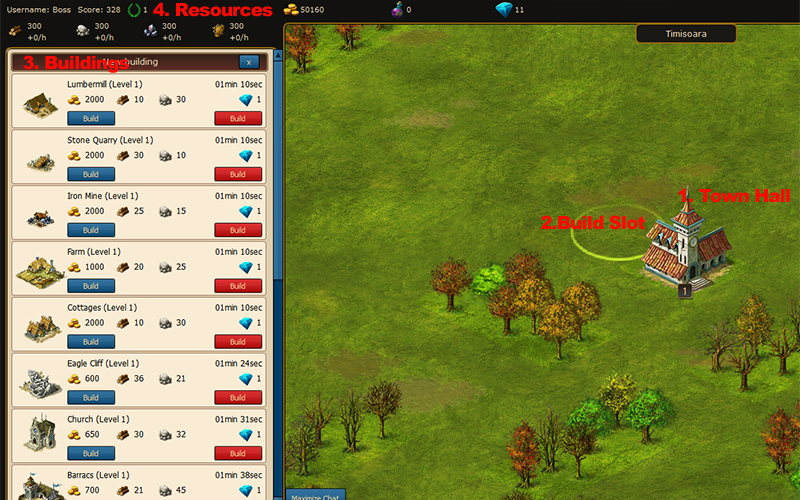
The town is the central point of your strategy. Depending on what strategy route you pick (military, economical, research), you have to build the appropriate buildings.
1. In the center of the town, you have the ‘Town Hall’, each town hall upgrade allows you to build 10 more buildings.
Constructing new buildings
2. In order to build a building, click next to the ‘Town Hall’ or any available slot, that does not have trees or bushes.
3. On the left you will see the list of buildings that can be built. For example, to build a ‘Lumber Mill’, simply click the ‘Build’ button below the resources (2000 gold, 10 lumber, 30 stone).
4. We have 6 types of resources in the game.
– Gold is produced by the ‘Town Hall’ and you can also gain gold by exploring the vast world of Legend of Gods with your hero
– Lumber is produced by ‘Lumber mills’ and is used for constructing and upgrading buildings.
– Stone is produced by ‘Stone Quarries’ and is used for constructing and upgrading buildings.
– Iron is produced by ‘Iron Mines’ and is used for unit and army recruitment.
– Food is produced by ‘Farms’ and is used for unit and army recruitment.
– Mana is produced by ‘Universities’ and is used for research.
Exploring the world of Legend of Gods
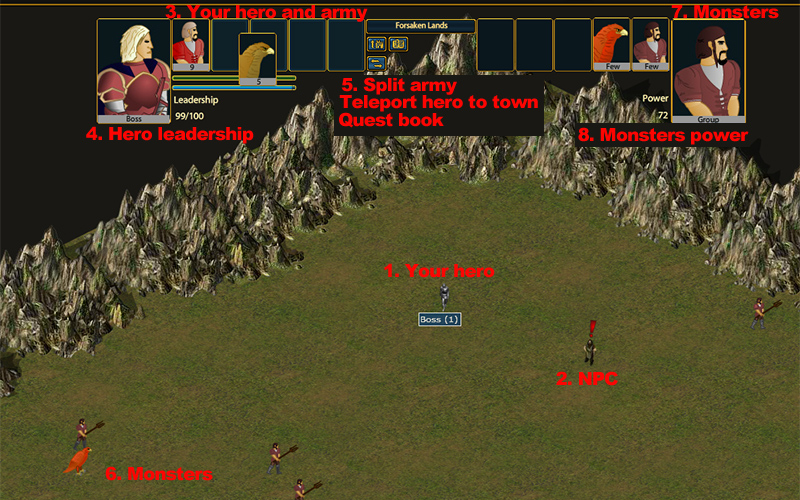
The exploration screen is where you hero can fight monsters and do quests.
1. The hero is in the center of the screen. Click on the map to move your hero.
2. NPC (Non-player caracter) are caracters on the map that give you quests and rewards for finalizing the quests and have a small exclamation mark above their head. Click to move and talk to them.
3. Here you can see the hero and your army. At the begining of the game you receive 5 peasants and 5 eagles. Move the mouse over them to see their stats.
4. The hero leadership is the total amount of army a hero can lead. For example each peasant takes 3 leadership points to lead, so for 100 leadership, your hero can lead 33 peasants. Each level up will grant your hero 100 extra leadership.
5. The split button allows you to split your army in smaller groups. You can reorder the units by draging a group of units from a slot to another.
You can only recruit units in the town. When you want to equip your hero with the new army, you use the ‘Teleport Hero To Town’ button and pick up the units from your town.
You can view the status of each quest by clicking on the ‘View Questbook’ button.
6. While exploring, your hero will face stronger and stronger monsters. Click a monster once to see their stats. Click again so that the hero moves and attacks that monster.
8. Power is the equivalent of leadership but it represents the power of a group of monsters.
The stats of a monster describe the same as the stats of a unit so it is important to pick the right unit to win a battle.
The Turn Based Battle
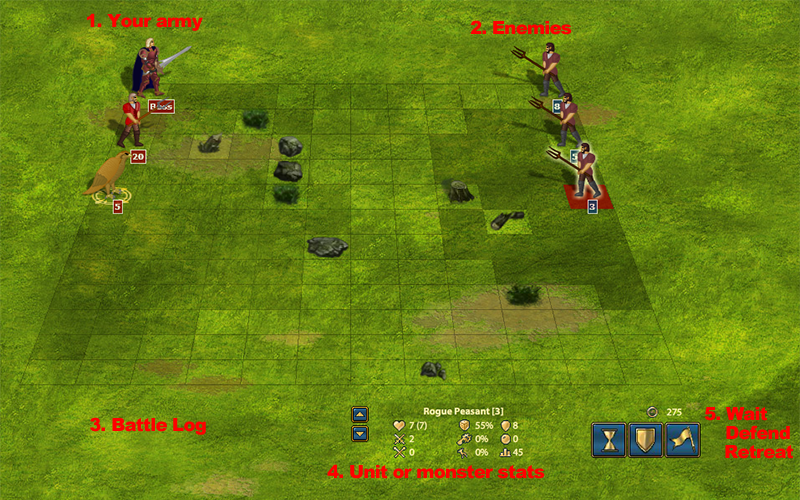
1. Your army is on the left, while the enemy army is on the right similar to chess. Each piece will take a turn and move or attack depending on their ‘Initiative’. (3) The ‘Battle Log’ will display all the results of each attack.
4. Move your mouse on the square below a monster/unit or hero to see their stats so that you can decide what monster to attack.
5.- Wait. Waits for the other pieces to take their turn.
– Defend. That piece does not do anything this round and waits for next round.
– Retreat. When you see that you may lose a battle, it is easier to retreat and fight again.
The battle in legendofgods is pretty similar in nature to that of a chessboard. The way you engage in battle is played like you would a chess game. Each one of your recruits will take turns in engaging in battle with your enemies while the “Battle Log” will give you real time results of each carefully planned attack. The adrenaline rush you get from engaging in battle is simply indescribable and well worth pursuing.
The Turn Based Battle. Attacking the enemy
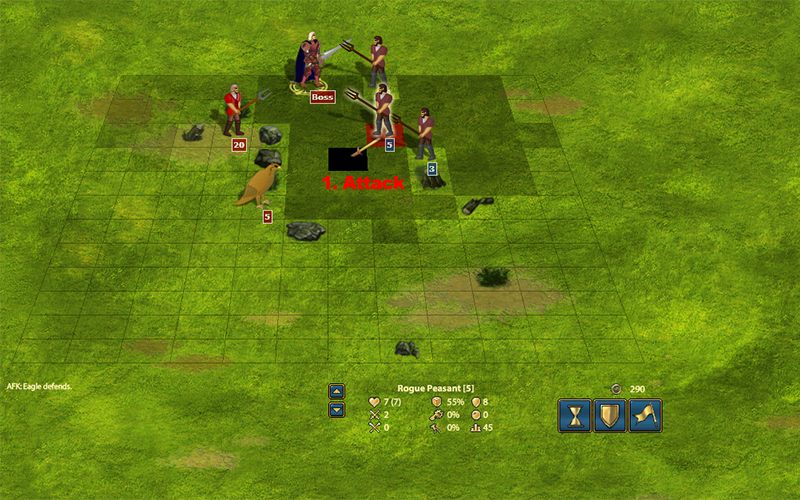
1. In order to attack a monster, you need to move your mouse below the monster.
The ‘Battle Sword’ will appear which shows you the angle of attack and will highlight the attack position.
Just click on the square below the monster and the unit/hero will move and attack.
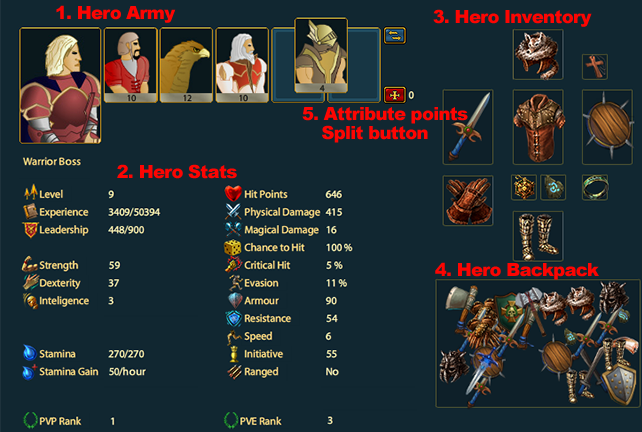
1. The hero has 5 army slots, that can be filled with different types of units. Picking the right unit will help you win battles. You can reorder the army or split the groups by using the split button(5).
2. The main hero stats are: strength, dexterity and inteligence. Move your mouse over all the stats to see their description and how you can improve your hero.
5. Each level will grant you 3 attribute points. Distribute them as you want so that you improve your hero.
3. The hero inventory contains the items the hero is equipped with. These items influence the hero stats and makes your hero stronger in battles. Based on your strategy and what you expect from your hero it is important to pick the right items.
4. The hero backpack contains the items the hero gained in battle. These items do not influence the hero stats and can be sold on auction or sold at the merchant for gold.
You can equip/unequip an item by dragging the item to and from the inventory to the backpack.
Building an army. Recruiting units.
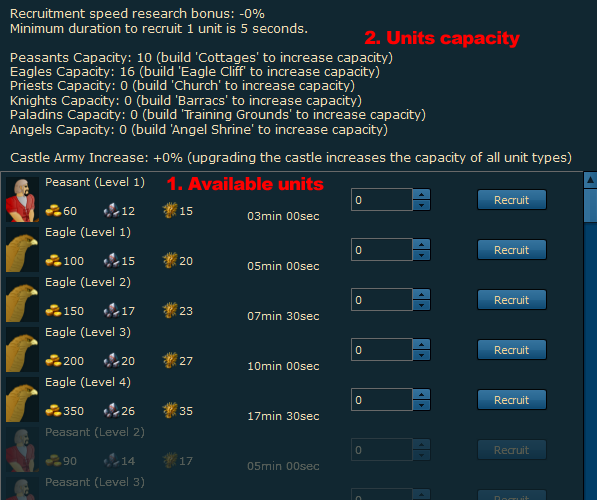
1. Here you can see the list of units that can be recruited. For example, in order to recruit level 4 peasants, you need to have at least one level 4 ‘Cottages’ built.
2. Building an army building allows you to recruit unit but also increases the total capacity of a type of unit in the town. For example, building more ‘Cottages’ will increase the total number of peasants that can be recruited.
This total army is composed of the: units of the hero, the units that are currently recruiting and the units that are in town.
Sell and buy items from the merchant
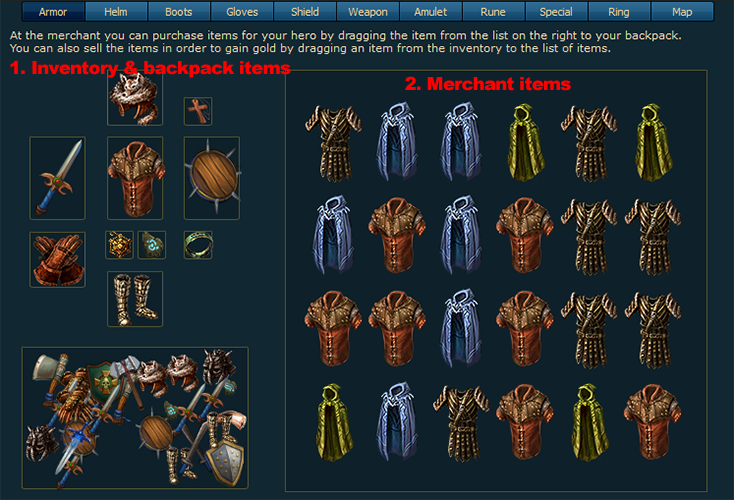
1. On the left side you can see the heroes backpack and inventory. To sell any item, you simply have to drag and drop it over the merchants list of items.
2. On the right side, you can see the merchant list of items. You can purchase an item from the merchant by dragging and dropping it over the inventory or backpack. The merchant will always give you half the value of an item, so sometimes it is better to sell that item at an auction.
Frequently asked questions
What is Legend of Gods?
Legend of Gods is a free browser-based fantasy strategy MMO. You build and upgrade a town, grow a roster of heroes, raise armies, explore an open world, and fight turn-based battles against monsters and other players, alone or in an alliance.
Is Legend of Gods free to play?
Yes. The full game is free to play in your browser with no download. Diamonds, the premium currency, buy convenience such as speeding up build and recruit queues - they never gate exclusive units, buildings, or content. Diamonds can also be earned through in-game offers.
Do I need to download anything to play?
No. Legend of Gods runs directly in your browser on desktop and mobile - open the site, create a free account, and play. There is nothing to install, and your town keeps producing while you are away.
Is Legend of Gods pay-to-win?
No. Diamonds buy speed and convenience only - never exclusive power that a free player cannot reach. The economy is designed so a dedicated free player can compete on equal terms, and any future change to that promise will be announced openly before it ships.
Can I play with friends?
Yes. Alliances let you coordinate attacks and defense, trade on the player-driven market, and fight alliance-scale wars. Alliance play is the heart of the game - recruiting friends early is the single best way to grow safely.